
BadgerQL guide
BadgerQL is the language you use to interact with your data stored in Insights. It was designed to enable you to enrich, shape, and combine your events so you can craft any view of your data. Quick reference docs are also available in the application via the book icon in the top-right corner of the query box.
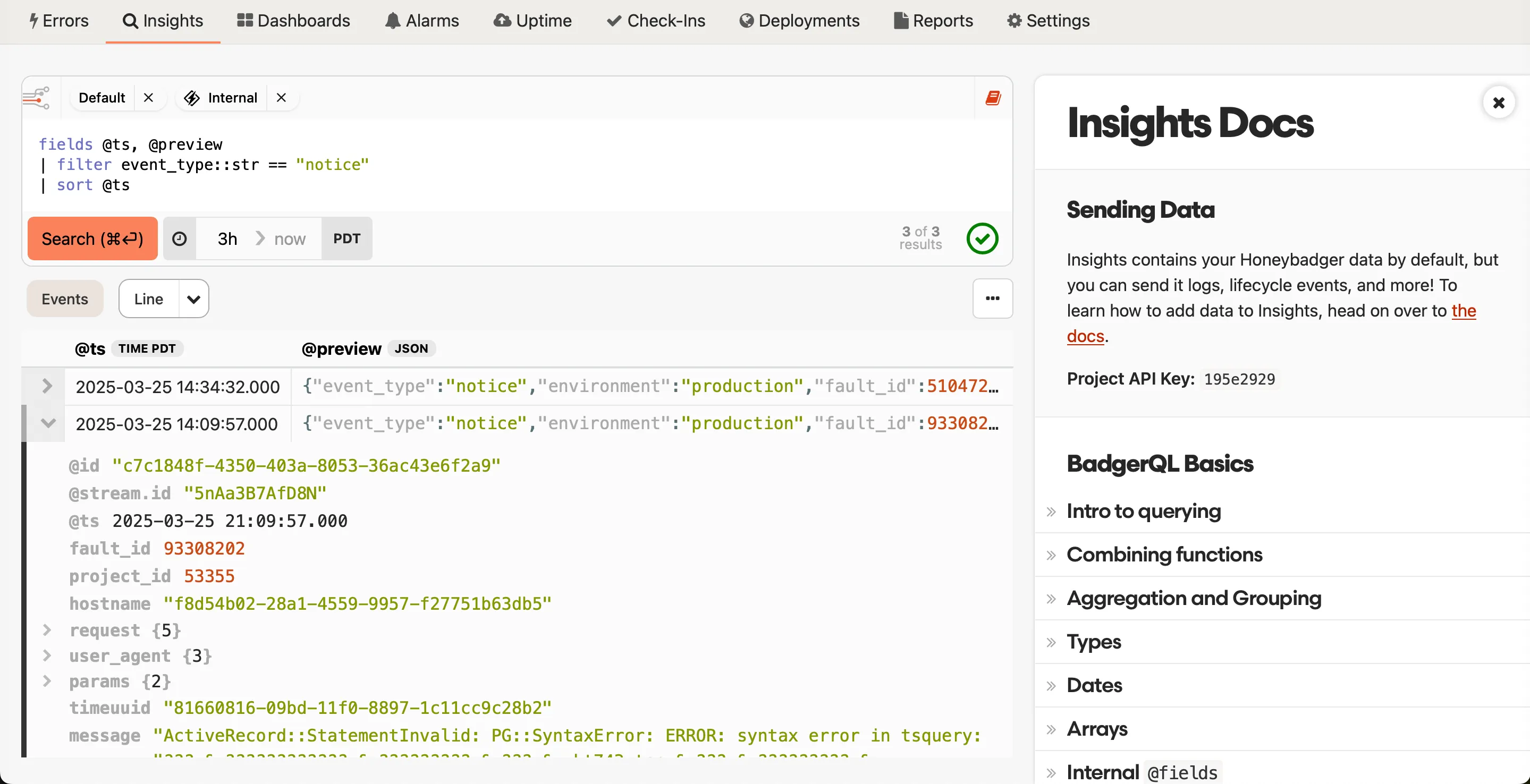
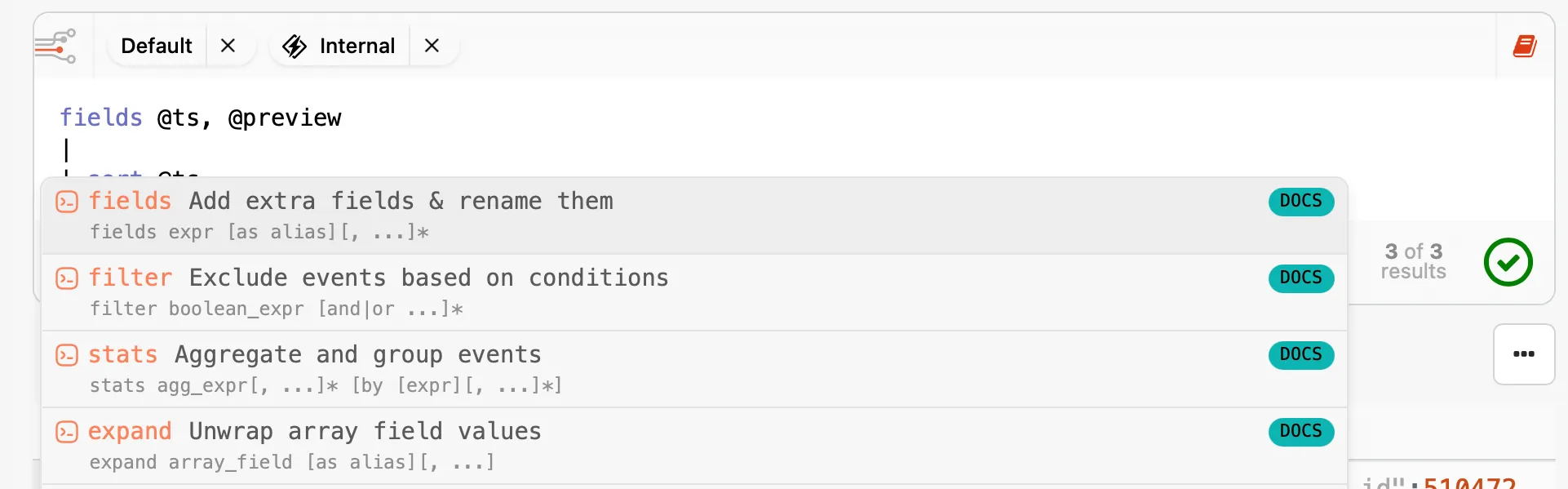
We also provide inline hints in the query editor that show info from the quick reference docs as you type:
Need a hand crafting BadgerQL queries? The natural language query translator can translate plain-English descriptions into queries, visualizations, and time ranges.
Example queries and use cases
Section titled “Example queries and use cases”Find N+1 queries in your Rails app:
filter event_type::str == "sql.active_record"| stats count() as queryCt, sum(duration::float) by request_id::str, query::str| sort queryCt desc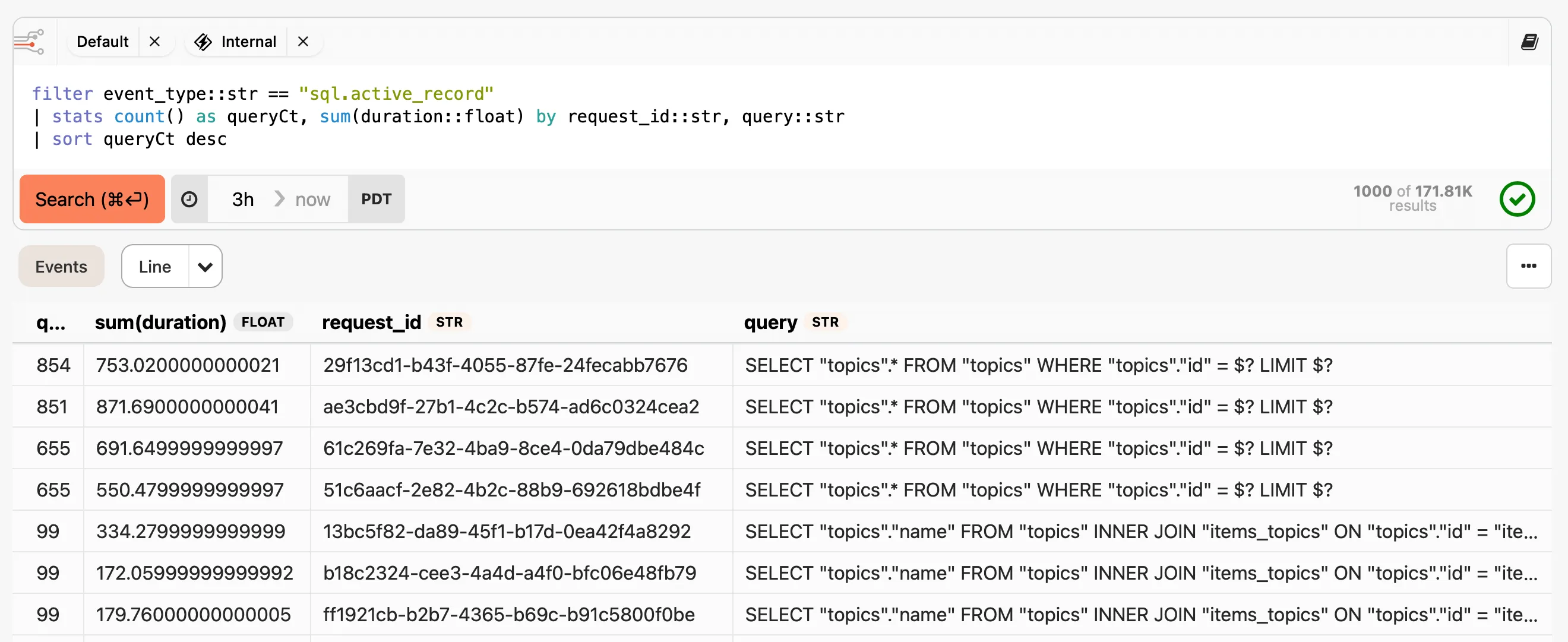
What events are consuming my Insights quota?
Be sure to deselect the Internal Stream so you only see the data you are sending:
stats sum(@size) as size by event_type::str| sort size| only toHumanString(size, "bytes"), event_type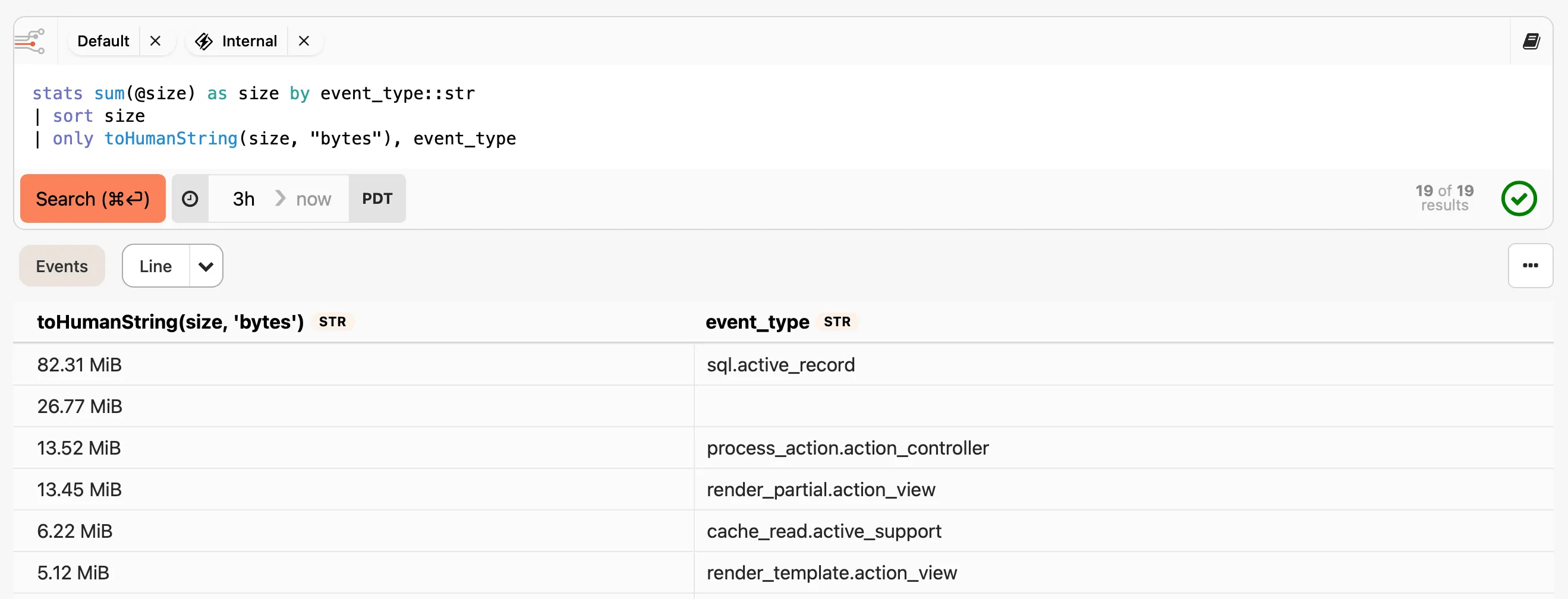
See more examples in the walk-through or review the full BadgerQL reference below for more information.
Parameterized queries
Section titled “Parameterized queries”Parameterized queries let you swap values into a query at runtime without editing the query itself. You can filter a dashboard to a single host, environment, or customer; share a prefilled URL with a teammate; or reuse the same widget across multiple contexts.
Parameters work anywhere you write BadgerQL, including dashboard widgets and the Insights query editor.
Use ${name} to reference a parameter in a query:
filter hostname::str == "${hostname}"Provide a default with ${name:-default}:
filter env::str == "${env:-production}"Parameter names must start with a letter or underscore, followed by letters, numbers, or underscores.
Parameter values can be provided in the URL (e.g., ?hostname=web-01),
allowing you to share query URLs with prefilled values,
or by clicking the parameters button (the slider icon in the dashboard toolbar,
next to the date picker) to open a popover with a field for each parameter used in the query.
Functions to enrich, shape, and combine data
Section titled “Functions to enrich, shape, and combine data”Functions are the core of BadgerQL. You can think of your data falling or piping
through each function that you specify, getting filtered, aggregated, and so on
along the way. The most common functions you will use are fields to
select fields to view, filter to restrict what data appears in the
results, and stats to do counts, averages, and other analyses. Keep
reading to learn about all the functions we offer.
Combining functions
Section titled “Combining functions”While calling a BadgerQL function on its own can produce interesting results,
the real power comes when piping functions together via the pipe (|) operator:
fields status_code::int, controller::str| filter startsWith(controller, "Stripe")| stats count() by status_codeEach function builds off the other to create a result showing the distribution of status codes just for Stripe controller requests.
Note that BadgerQL does not work like SQL. Each successive function is applied to the result of the previous, so you can only reference fields down the pipeline.
For example, if you want to convert a string to a number gathered from a parse
function, you can pipe into another fields function:
parse url::str /id=(?<id>\d+)/| fields toInt(id) as idExpand
Section titled “Expand”You can use expand to turn an event that has a field with array data into
multiple events.
expand array_field [as alias][, ...]With data that has a single event like {"id": 1, "charges": [700, 430, 200]},
the following query will return three events, with id and charge fields:
expand charges[*]::int as chargeSee the Arrays section for more detail on working with array data.
Use fill to inject events for missing data points.
fill field_expression [as alias] [asc|desc|up|down] [from ...] [to ...] [step ...] [across field [bounded | including [...]]]* [with field[ = expression][, ...]*]Unless specified with from or to, fill will determine the min and max
values of the field_expression, sort, and produce new events with missing
field_expression values replaced by the incremented or decremented step value.
field_expression only allows for number or temporal types. The resulting
optional clause types differ based on the resolved type:
fill number [from number] [to number] [step number]fill temporal [from temporal] [to temporal] [step interval]Fill works best when referencing an already existing field. Since fill inserts data at a regular interval, you will also get the best results if the field follows the step size of the fill.
Typical usage
Section titled “Typical usage”Take a stats call that bins the count of events per hour:
stats count() as ct by bin(1h) as binYou might get sparse results if there is not enough data to fill each bin:
| ct | bin |
|---|---|
| 5 | 2023-04-05 02:00:00.000 |
| 10 | 2023-04-05 04:00:00.000 |
| 2 | 2023-04-05 06:00:00.000 |
With the fill function (the step is inferred from bin(), so a bare fill bin is enough):
stats count() as ct by bin(1h) as bin| fill binYou can produce a full binned result set:
| ct | bin |
|---|---|
| 5 | 2023-04-05 02:00:00.000 |
| 0 | 2023-04-05 03:00:00.000 |
| 10 | 2023-04-05 04:00:00.000 |
| 0 | 2023-04-05 05:00:00.000 |
| 2 | 2023-04-05 06:00:00.000 |
Automatic step from bin() and bucket()
Section titled “Automatic step from bin() and bucket()”If the fill field comes from a bin() or bucket(), you don’t need to repeat
the step. fill picks it up automatically. bin(1h) gives you a 1-hour step,
bucket(x, 100) gives you a 100-wide step, and the bounded form
bucket(x, 0, 1000, 20) gives you from, to, and step all at once. You can
still pass an explicit step, from, or to to override.
stats count() as ct by bucket(duration::int, 0, 2000, 20) as ms| fill ms| sort ms ascThe bucket width is 2000 / 20 = 100, so fill inserts a row for every
100-wide slot that had no matching events:
| ct | ms |
|---|---|
| 12 | 0 |
| 0 | 100 |
| 0 | 200 |
| 45 | 300 |
| 30 | 400 |
| 0 | 500 |
| … | … |
Filling across dimensions
Section titled “Filling across dimensions”Add across <field> to fill every combination of the fill field and a grouping
dimension. This is useful for stacked charts, heatmaps, or any per-category
series where you want explicit zeros instead of missing rows.
stats count() as count by bin(1h) as t, status::str| fill t across statusEvery combination of time bin and status gets a row, with 0 for missing cells:
| count | t | status |
|---|---|---|
| 8 | 2023-04-05 02:00:00.000 | 200 |
| 0 | 2023-04-05 02:00:00.000 | 500 |
| 0 | 2023-04-05 03:00:00.000 | 200 |
| 3 | 2023-04-05 03:00:00.000 | 500 |
You can chain multiple across clauses:
stats count() as count by bin(1h) as t, status::str, region::str| fill t across status across regionCounting aggregates (count, sum, unique and their *If variants) default
to 0 on filled cells. Everything else defaults to null. Use
with field = value to pick a different default.
bounded
Section titled “bounded”Without bounded, across fills every category across the entire range of the
fill field. Say temp reported from 02:00–04:00 and humidity only reported
at 05:00. Plain across would create rows for both sensors across the full
02:00–05:00 range. across field bounded limits each category to its own
observed range instead:
stats count() as count by bin(1h) as t, sensor::str| fill t across sensor bounded| count | t | sensor |
|---|---|---|
| 5 | 2023-04-05 02:00:00.000 | temp |
| 0 | 2023-04-05 03:00:00.000 | temp |
| 3 | 2023-04-05 04:00:00.000 | temp |
| 7 | 2023-04-05 05:00:00.000 | humidity |
No rows for humidity at 02:00–04:00, and no rows for temp at 05:00.
You can’t combine bounded with including on the same dimension, or with
explicit from/to.
including
Section titled “including”across field including [...] ensures specific values show up in the result
even if they’re missing from the data. The pinned values are added on top of
whatever the query discovers, so you won’t lose any existing categories. All
values in the array must be the same type.
stats count() as count by bin(1h) as t, op::str| fill t across op including ["create", "delete"]The "create" and "delete" values appear even if the data only contains
"update" events:
| count | t | op |
|---|---|---|
| 0 | 2023-04-05 02:00:00.000 | create |
| 0 | 2023-04-05 02:00:00.000 | delete |
| 4 | 2023-04-05 02:00:00.000 | update |
| 1 | 2023-04-05 03:00:00.000 | create |
| 0 | 2023-04-05 03:00:00.000 | delete |
| 0 | 2023-04-05 03:00:00.000 | update |
This is also useful for keeping chart legends stable. If a category has zero
events across the entire query range, across alone won’t include it.
including pins those categories into the result so they always appear.
Fill order
Section titled “Fill order”By default, the fill function sorts the field_expression in ascending order
before injecting fill events. You can change this by providing an order
direction after the field_expression:
fill @ts desc step -1hWhen filling in descending order, from must be greater than to and step
must be a negative value.
@fill internal field
Section titled “@fill internal field”Filled events have an additional internal @fill field added to the results.
You can use this field to determine when an event is filled:
fields @fill| fill duration::int from 100 to 500 step 100| @fill | duration |
|---|---|
| true | 200 |
| true | 300 |
| 325 | |
| true | 400 |
Filling other fields
Section titled “Filling other fields”Most fields other than field_expression will be filled with a null value for
injected events. You can control what data is replaced using the with clause.
Setting the with field to the field_expression will result in an error.
If with is given only a field, it will carry over the field value from the
previous event:
fields @fill, controller::str| fill duration to 340 step 10 with controller| @fill | duration | controller |
|---|---|---|
| 300 | login | |
| true | 310 | login |
| 320 | sign-up | |
| true | 330 | sign-up |
with fields can also be set to specific values for filled events:
stats avg(temp::float) as avgTemp by bin(1d) as bin| fill bin step 1d with avgTemp = 65.0| avgTemp | bin |
|---|---|
| 73.3 | 2023-04-08 |
| 65.0 | 2023-04-09 |
| 68.9 | 2023-04-10 |
| 65.0 | 2023-04-11 |
Referencing other fields from previous events is also possible, acting like a
LAST_VALUE() window function.
- Having multiple fills is possible by piping together
fillfunctions, but take care to ensure you are not injecting too many events. fromandtovalues are not inclusive when producing injected results.
Fields
Section titled “Fields”The fields function enriches your results by adding extra fields. Any fields
that you select or alias can be referenced in later functions, and they will be
returned in the final dataset unless rewritten by later functions.
fields expr [as alias][, ...]*Fields can be aliased with the as clause, and unsupported characters (like
spaces) can be used by using backticks.
fields user_name::str as `User name`Aliased fields can be used in later functions:
fields concat(first_name::str, " ", last_name::str) as full_name| filter full_name match /^Bob.*/Internal fields
Section titled “Internal fields”We set the following internal fields for you as the data is ingested:
| Name | Type | Description |
|---|---|---|
@id | String | The event ID |
@ts | DateTime | The reported timestamp if provided as ts or timestamp; otherwise, the time when the event was received |
@received_ts | DateTime | The time when the event was received |
@stream.id | String | The ID of the stream that contains the event. Each project contains at least two streams: the internal Honeybadger stream used for notices, etc., and the stream used for storing events that you send to our API. |
@stream.name | String | The name of the stream |
@query.start_at | DateTime | The timestamp of start of the range queried. E.g., when searching back 3 hours (the default), this will be three hours ago |
@query.end_at | DateTime | The timestamp of end of the range queried. E.g., for the default query, this would be the time when the query was executed, since the default query searches for data up to the time the query was sent. |
@size | Integer | The size in bytes of the event |
@fill | Boolean | Whether the result has filled-in values |
@preview | JSON Object | A preview of the data stored for the event |
Filter
Section titled “Filter”Filter expects a body that results in a boolean expression, and it will exclude events where the expression returns false.
filter boolean_expr [and|or ...]*Multiple piped filter functions will act as AND operations.
filter controller_name::str == "StripeController" and duration::float > 2000| filter action_name::str == "hook"Limit the number of results returned by the query.
limit integer [by expr[, ...]*]Include a by clause to limit the number of results per group.
limit 10 by user_id::intPipe into limit to restrict the final number of results returned by the query.
limit 5 by user_id::int| limit 100Use only to restrict which fields are rendered in the results and in which
order they will appear.
only expr [as alias][, ...]*For example, if you want to filter on a particular field, but you don’t want
that field to appear in the results, you can use only to select the fields you
want to see:
fields a, b, c| filter c > 2| only b, aExtract fields using regular expressions
parse expr /regex/If your events have data that can be extracted using regular expressions, you can create fields from that data. The following example will extract “redis” from an event that has a field named “addon” that contains the value “redis-fitted-71581” and place it in a new field called “service”. Both the “addon” and “service” fields will appear in the results.
fields addon::str| parse addon /(?<service>[[:alpha:]]+)/Order events based on fields.
sort expr [desc|asc][, ...]*Queries without an explicit sort are unordered and non-deterministic. Sort
direction can be either desc (descending) or asc (ascending). By default,
fields are sorted in descending order if not specified.
sort day desc, duration ascSort is useful to order results by time, or when calculating stats:
fields email| filter action::str == "Logged in"| stats count() as count by email| sort countIt can make sense to call sort multiple times, as sorting after rewriting
functions might be necessary.
Aggregate event fields
stats agg_expr[, ...]* by [expr][, ...]*The workhorse of Insights, stats allows you to perform calculations on your
data. You can count events, calculate averages, and more.
stats avg(response_time::float)Aggregation
Section titled “Aggregation”Available aggregate functions:
| Function | Description |
|---|---|
count() | Returns the total count of all results. Can contain an expression that filters the count |
avg(field) | Calculates the average (mean) value for a numeric field |
min(field), max(field) | Returns the minimum/maximum value for the given field |
sum(field) | Calculates the sum of values for a numeric field |
percentile(percentage, field) | Returns the value at the specified percentile for the given numeric field |
unique(field) | Returns the number of unique values for the specified field |
first(field), last(field) | Returns the first/last value of the specified field for the whole aggregate |
apdex(field, threshold) | Calculates an Apdex (Application Performance Index) score between 0 and 1 |
Find the number of 500 errors over a time period:
filter status_code::int == 500| stats count()Find the average response time for a specific endpoint:
filter endpoint::str == "/api/v1/orders"| stats avg(duration::float)Combine multiple aggregate functions in a single query:
filter environment::str in ["production", "staging"]| stats count(), percentile(95, duration::float)Grouping
Section titled “Grouping”The by clause allows you to group the results by one or more fields.
stats avg(response_time::float) by location::strOne of the most common use cases for grouping is to create a time series by
grouping with bin().
The bin() function
Section titled “The bin() function”bin() rounds a datetime down to the nearest interval boundary, which lets you
group events into time buckets (e.g., “all events in this 1-hour window”).
bin([interval[, datetime]])Both arguments are optional:
interval— the bucket size, written using interval syntax (e.g.1h,30m,2d). If omitted,bin()automatically picks a reasonable size based on your selected time range.datetime— the field to bin. Defaults to@ts. Use this when you want to bin on a field other than the event timestamp.
stats count() by bin(1h) as timestats count() by bin(1h, toDateTime(user.created_at::str)) as timeWhen no alias is given, the result column is named after the call itself (e.g.
bin(1h)). Always alias bin() when you need to reference it in a later
function like sort or fill.
Interval syntax — an integer followed by a unit abbreviation:
| Unit | Abbreviation | Example |
|---|---|---|
| Seconds | s | 30s |
| Minutes | m | 15m |
| Hours | h | 1h |
| Days | d | 7d |
| Weeks | w | 1w |
| Months | mon | 1mon |
Auto-sizing — when bin() is called with no interval argument, the bin
size is automatically chosen to produce a reasonable number of buckets for your
selected time range.
stats count() by bin() as time, status_code::intYou can use any field or expression in the by clause:
stats avg(duration::float), max(duration::float)by bin() as time, concat(controller::str, "#", action::str) as controllerActionUnique
Section titled “Unique”The unique function filters out duplicate events based on the field(s) you
specify.
unique field[, ...]Toggling functions
Section titled “Toggling functions”Hotkey: CTRL + /
When exploring data in BadgerQL, you might find it useful to temporarily ignore certain functions while keeping them in the query.
To do this, add a bang (!) at the beginning of the BadgerQL function. This
comments out the function, effectively ignoring it without removing it from the
query.
This is particularly useful for toggling conditions in statistical analyses. For example, you might want to alternate between including and excluding certain filters:
fields event_type::str, duration::int| filter event_type == "page_view"| !filter duration > 100| stats count() by bin(1d)Note that if a function spans multiple lines, placing a bang (!) at the
beginning will toggle the entire function, not just the first line:
fields event_type::str, duration::int| filter event_type == "page_view"| !filter duration > 100 and duration < 200| stats count() by bin(1d)In Insights, data is stored and accessed in its typed format. BadgerQL is a strongly typed language, which means it is particular about type consistency.
We currently support storing data with these types:
| Short | Long |
|---|---|
str | String |
bool | Boolean |
float | Float |
int | Integer |
Type hinting
Section titled “Type hinting”Type hinting is key in BadgerQL. You indicate the expected field type using
:: and the short type name.
For example, if you know you are sending status codes as integers, you must augment your query to point to the field like:
fields status_code::intThis only gives the system a hint for where to look for the event field. It does not coerce the value into another type. If you want to convert types, use one of the conversion expression functions.
It’s not required to repeat type hints. If you use a field with a type hint earlier, it carries over:
fields status_code::int| stats count() by status_codeConflicting type hints or inaccurate hints can result in null values or errors.
We also support using these types (either through conversion or as a function result) in queries:
| Short | Long |
|---|---|
datetime | Datetime |
date | Date |
tzdatetime | Datetime with timezone |
interval | Relative time intervals (e.g. 1h) |
Note: you can’t hint these types, as we don’t store data in these formats.
Union types
Section titled “Union types”You may see number and temporal appear in function signatures throughout
the docs. These are not types you can use directly in queries; they are
shorthand for describing which concrete types a function accepts. number
means the function works with either int or float, and temporal means it
works with either date or datetime.
Literal values
Section titled “Literal values”Some function arguments don’t accept field references, only literals (e.g.,
1.5, "hi"). This is denoted in the type signature.
For instance, round(duration::float, 0) is valid with the second argument as
a literal integer. round(duration::float, precision::int) would produce an
error.
Creating dates
Section titled “Creating dates”We provide a shorthand for creating datetime literal values by wrapping the
date in curly brackets {}:
fields {2023-01-01} as baseDateCasting dates
Section titled “Casting dates”There is no way to store native dates in Insights, so if you want to interact
with a native date or datetime, you will need to cast a string column to
one of the temporal types:
fields toDateTime(created_at::str) as created_at| filter created_at > {2023-04-08 12:00:00}Timezones
Section titled “Timezones”All datetimes are returned in your selected timezone by default. This means that if you input a datetime, it will be automatically converted to match your preferred timezone setting.
To adjust datetimes to a specific timezone for a query, use the toTimezone
function:
fields toTimezone(@ts, "America/Los_Angeles")This will show the timestamp in PST, which will be denoted in the timezone
information contained within the field type (tzdatetime.PST for this example).
Arrays
Section titled “Arrays”Insights is primarily designed to work with simple key/value data mappings, however, it does support ingesting and querying array data in your events.
To access fields within an array, use bracket notation to specify an index. For
example, user.scopes[0].name::str is a valid path into your event data.
Expand function
Section titled “Expand function”The most flexible tool for working with arrays is the expand BadgerQL
function. expand unwraps array data into individual events, which you can
then pipe into any other function.
For example, given events containing this data:
{"id": 1, "charges": [700, 430, 200]}{"id": 2, "charges": [100]}You can expand the charges field using wildcard notation:
expand charges[*]::int as chargeThis will expand each result to:
| id | charge |
|---|---|
| 1 | 700 |
| 1 | 430 |
| 1 | 200 |
| 2 | 100 |
Note: Just like looking up a field, the path must reference a set of values. You can’t expand into an object or another array.
You can then use stats to group events back together after processing:
expand charges[*]::int as charge| filter charge > 200| stats sum(charge) as total_cost by idWhich will combine the filtered events back with summed charges:
| id | total_cost |
|---|---|
| 1 | 1130 |
Conditional array matching
Section titled “Conditional array matching”Sometimes you want to know if a value within an array passes some condition. We have special expression functions just for this case. For example, to find events with a specific tag:
filter any(tags[*]::str == "funky")The any function also works with nested object data within an array:
filter any(events[*].user.email::str like "kwebster%")Performance implications
Section titled “Performance implications”Array support is limited in terms of performance optimizations. Where possible, consider flattening array data into separate events before sending them to Honeybadger.
Expression functions
Section titled “Expression functions”Expression functions can be used in a variety of places, such as filtering data, creating fields, calculating aggregates, etc. They are used to compare fields, perform arithmetic, reformat data, and more.
Comparison
Section titled “Comparison”The comparison operators work across number, string, boolean, and
datetime types. != and <> are equivalent operators.
between and not between are inclusive on both ends:
filter status_code::int between 200 and 299either returns the first non-null value from its arguments — useful as a
fallback when a field may be stored under different names:
fields either(name::str, full_name::str, username::str) as name!=Inequality comparison. Also written
<>.Signaturet = number | string | boolean | datetimet != t -> booleanExamplefields status_code::int != 200<- Signature
t = number | string | boolean | datetimet < t -> booleanExamplefields status_code::int < 500 <=- Signature
t = number | string | boolean | datetimet <= t -> booleanExamplefields status_code::int <= 200 <>Inequality comparison. Also written
!=.Signaturet = number | string | boolean | datetimet <> t -> booleanExamplefields status_code::int <> 200==- Signature
t = number | number[] | string | string[] | boolean | boolean[] | datetime | datetime[]t == t -> booleanExamplefields status_code::int == 200 >- Signature
t = number | string | boolean | datetimet > t -> booleanExamplefields status_code::int > 500 >=- Signature
t = number | string | boolean | datetimet >= t -> booleanExamplefields status_code::int >= 200 between- Signature
t = number | string | datetimet between t and t -> booleanExamplefilter status_code::int between 200 and 300 coalesceReturns the first non-null value. Synonym of
either.Signaturet = integer | float | string | boolean | datetimecoalesce(t, ...t) -> tExamplefields coalesce(name::str, full_name::str, username::str) as nameeitherReturns the first non-null value. Also accepts
coalesce.Signaturet = integer | float | string | boolean | datetimeeither(t, ...t) -> tExamplefields either(name::str, full_name::str, username::str) as nameilikeReturns true when the search string matches
Can use these metacharacters:
%- Matches an arbitrary amount of characters_- Matches single arbitrary characterThe matcher is case insensitive
Signaturestring ilike string -> booleanExamplefilter email::str ilike "%compuserve%"inReturn true if field value is contained within the array of literal values. The field type must match value type in the array.
Signaturet = number | string | datetimet in t[] -> booleanExamplefilter status_code::int in [300, 301, 404]isNotNull- Signature
t = number | string | boolean | datetimeisNotNull(t) -> booleanExamplefilter isNotNull(status_code::int) isNull- Signature
t = number | string | boolean | datetimeisNull(t) -> boolean likeReturns true when the search string matches
Can use these metacharacters:
%- Matches an arbitrary amount of characters_- Matches single arbitrary characterThe string matcher is case sensitive
Signaturestring like string -> booleanExamplefilter email::str like "%compuserve%"matchReturns true when the regex matches
The regex uses re2 regex syntax
Signaturestring match regex -> booleanExamplefilter email::str match /.*compuserve.*/not between- Signature
t = number | string | datetimet not between t and t -> booleanExamplefilter status_code::int not between 300 and 400 not ilikeReturns true when the search string does not match
Can use these metacharacters:
%- Matches an arbitrary amount of characters_- Matches single arbitrary characterThe matcher is case insensitive
Signaturestring not ilike string -> booleanExamplefilter email::str not ilike "%compuserve%"not inReturn true if field value is not contained within the array of literal values. The field type must match value type in the array.
Signaturet = number | string | datetimet not in t[] -> booleanExamplefilter status_code::int not in [300, 301, 404]not likeReturns true when the search string does not match
Can use these metacharacters:
%- Matches an arbitrary amount of characters_- Matches single arbitrary characterThe string matcher is case sensitive
Signaturestring not like string -> booleanExamplefilter email::str not like "%compuserve%"not matchReturns true when the regex does not match
The regex uses re2 regex syntax
Signaturestring not match regex -> booleanExamplefilter email::str not match /.*compuserve.*/
Arrays
Section titled “Arrays”allReturn true if the predicate is true for every element of an expanded array. Returns true on empty arrays (vacuous truth).
Signatureall(boolean) -> booleanExamplefilter all(tags[*]::str != "severe")filter all(coupon_ids[*]::int not in [123, 456])The predicate must reference at least one expanded array (a field with
[*]). That tellsall()which array to iterate over.filter all(tags[*]::str != "severe")Empty arrays
all()returnstrueon an empty array — there are no elements to violate the predicate. This is mathematically consistent (vacuous truth) but bites people who expect "all" to imply "at least one." If you need both "non-empty" and "all match," combineall()with a separateany()check.Nested object data
[*]works inside object paths, so you can require a property on every element of an array of objects:filter all(events[*].status::str == "ok")Performance
Array operations don't benefit from the same indexing that scalar fields do. If you find yourself querying array data heavily, consider sending the events with the array already unrolled.
anyReturn true if the predicate is true for at least one element of an expanded array. Returns false on empty arrays.
Signatureany(boolean) -> booleanExamplefilter any(tags[*]::str == "severe")filter any(coupon_ids[*]::int in [123, 456])The predicate must reference at least one expanded array (a field with
[*]). That tellsany()which array to iterate over.filter any(tags[*]::str == "severe")Nested object data
[*]works inside object paths, so you can check fields on each element of an array of objects:filter any(events[*].user.email::str like "kwebster%")Empty arrays
any()returnsfalseon an empty array — there's nothing to match.Comparison vs membership predicates
The predicate inside
any()can be anything that returns a boolean — equality,in/not in,like, range checks, or expressions on nested fields:filter any(coupon_ids[*]::int in [123, 456])filter any(prices[*]::float > 100.0)You can't drop the
any()and writetags[*]::str in ["severe"]directly —inneeds a scalar on its left, andtags[*]::stris an array.any()is what unrolls the array and feeds each element into the predicate one at a time.Performance
Array operations don't benefit from the same indexing that scalar fields do. If you find yourself querying array data heavily, consider sending the events with the array already unrolled.
containsReturns true when the array contains the value. Use for simple array membership without writing
any(arr[*] == value).Signaturecontains(string[], string) -> booleancontains(number[], number) -> booleanExamplefilter contains(tags[*]::str, "severe")dedupeRemoves duplicate elements from an array, keeping one copy of each value. Compose with
collectto gather distinct values per group.Signaturet = string[] | number[] | boolean[] | datetime[]dedupe(t) -> tExamplefields dedupe(tags[*]::str) as tagsstats dedupe(collect(user_id::str)) as users by error_class::strreverseReturns the array with its element order reversed.
Signaturet = string[] | number[] | boolean[] | datetime[]reverse(t) -> tExamplefields reverse(sort(scores[*]::int)) as descending_scoressortReturns the array sorted ascending. This is the array function
sort(...), not the pipeline stage| sort ...; compose withreversefor descending order.Signaturet = string[] | number[] | boolean[] | datetime[]sort(t) -> tExamplefields sort(scores[*]::int) as sorted_scoressubarrayReturns
lengthelements of the array starting atstart; array positions are 1-based, so1is the first element.Signaturet = string[] | number[] | boolean[] | datetime[]subarray(t, integer, integer) -> tExamplefields subarray(tags[*]::str, 1, 3) as first_three
if is single-branch conditional: if the condition is true it returns the
then value, otherwise it returns the else value. The else arm also fires
when the condition evaluates to null.
fields if(status_code::int >= 500, "error", "ok") as resultcond is multi-branch: condition/value pairs are evaluated in order and the
value from the first matching pair is returned. A final bare value (no
preceding condition) acts as the fallback:
fields cond( status_code::int >= 500, "red", status_code::int >= 300, "yellow", "green") as severityand- Signature
boolean and boolean -> boolean condMultiple path conditional branching
The
cond()function allows for evaluating branches (ala.ifandelse if) through positional arguments. Each successive pair of arguments acts as an else if, with the first true boolean passing it's result as a return."Signaturet = string | boolean | number | datetime | datecond(boolean, t, boolean, t, ..., t) -> tExamplefields cond(status_code >= 300, "yellow",status_code >= 500, "red","green") as status_code_colorifSingle path conditional branching
Signaturet = string | number | boolean | temporal | intervalif(boolean, t, t) -> tExamplefields if(toDayOfWeek(ts) == 2, "taco", "slop") as food_daynot- Signature
not(boolean) -> boolean or- Signature
boolean or boolean -> boolean
Arithmetic
Section titled “Arithmetic”The standard operators (+, -, *, /, %) work on numbers. A few
noteworthy behaviors:
- Subtracting two
datetimevalues returns the difference in seconds as an integer:end_ts::datetime - start_ts::datetime - Adding an interval to a datetime shifts it forward:
@ts + 1h - The second argument to
round,floor, andceilis the number of decimal places and must be a literal integer — you cannot pass a field reference.round(duration::float, 2)is valid;round(duration::float, precision::int)is not.
-- Signature
number - number -> numberdatetime - number -> datetimedatetime - interval -> datetimedatetime - datetime -> integer *- Signature
number * number -> number /Division. Dividing by an interval converts a number of seconds — such as a datetime difference — into that unit:
(finished - started) / 1his hours.Signaturet = number | intervalnumber / t -> floatExamplefields (toDateTime(finished_at::str) - toDateTime(started_at::str)) / 1h as hours%- Signature
number % number -> number +- Signature
number + number -> numberdatetime + number -> datetimedatetime + interval -> datetime abs- Signature
abs(number) -> number bucketAssign a numeric value to a bucket and return that bucket's start value.
bucket(value, width)useswidth-sized steps anchored at zero.bucket(value, min, max, n)divides[min, max]intonequal bucket slots; values outside that range return null.Signaturebucket(number, literal number) -> numberbucket(number, literal number, literal number, literal integer) -> numberExamplestats count() as ct by bucket(duration::int, 250) as msstats count() as ct by bucket(duration::int, 0, 5000, 16) as msThe width form is the numeric counterpart of
bin()for time:bucket(duration::int, 100)maps250to200, the start of its 100-wide bucket. Negative values land on the same grid (-50maps to-100).The bounded form fixes the range and bucket count instead: the width is
(max - min) / n, sobucket(duration::int, 0, 1000, 4)creates starts at0,250,500, and750.100maps to0,999maps to750, and a value exactly equal tomaxalso maps to the last bucket. Anything outside[min, max]returns null; filter the range first if you do not want an out-of-range null group.Histograms
bucket()only assigns rows that already exist. Group by the bucket and count, thenfillto make empty buckets explicit. The fill grid is inferred from the bucket — its width becomes the step, and the bounded form's min/max become from/to:stats count() as ct by bucket(duration::int, 0, 2000, 20) as ms| fill ms| sort ms ascWhy explicit parameters
The width (or bounds and count) are part of the query, so the bucket grid is stable — the same query yesterday and today produces comparable buckets, and outliers can't warp the ranges.
ceil- Signature
ceil(number, literal integer) -> float exp- Signature
exp(number) -> float floor- Signature
floor(number, literal integer) -> float intDivDivide two numbers and return the integer quotient. Use
/when you want a floating-point result.SignatureintDiv(number, number) -> integerlog- Signature
log(number) -> float log10- Signature
log10(number) -> float log2- Signature
log2(number) -> float pow- Signature
pow(number, number) -> float round- Signature
round(number, literal integer) -> float signReturns -1 for negative numbers, 0 for zero, and 1 for positive numbers.
Signaturesign(number) -> integersqrt- Signature
sqrt(number) -> float truncateDrop digits past the given number of decimal places without rounding. This is different from
floor, which always rounds down.Signaturetruncate(number, literal integer) -> float
Conversion
Section titled “Conversion”A few things worth knowing:
toDateTimefrom a string uses best-effort parsing, so it handles a wide variety of date formats (ISO 8601, RFC 2822, etc.) without needing an exact format string.toUnixreturns milliseconds since the Unix epoch, not seconds.toDatestrips the time component from a datetime and returns a date-only value.
toDate- Signature
t = string | datetimetoDate(t) -> date toDateTime- Signature
t = number | date | string | temporaltoDateTime(t) -> datetime toFloat- Signature
toFloat(any) -> float toInt- Signature
toInt(any) -> integer toString- Signature
toString(any) -> string toUnix- Signature
toUnix(datetime) -> integer
now() returns the current datetime in the query’s configured timezone.
toStartOf and toEndOf are lower-level alternatives to bin() when you
need the start or end of an interval boundary rather than grouping:
fields toStartOf(1w) as week_startfields toEndOf(1d) as end_of_daytoDayOfWeek returns 1–7 where 1 = Monday and 7 = Sunday.
See also the Dates section above for creating and casting date literals.
binRound a datetime down to the nearest interval boundary. Most often used in
stats ... by bin(...)to bucket events into a time series.Signaturebin(datetime = `@ts`) -> datetimebin(interval, datetime = `@ts`) -> datetimeExamplefields bin(1w) as beginning_of_weekstats count() by bin(1h, toDateTime(user.created_at::str))Choosing the interval
If you pass an interval, that's the bin size:
stats count() by bin(1h)If you omit the interval,
bin()picks a size based on the query's time range — small bins for short ranges, larger bins for longer ones. The exact thresholds aren't fixed, so pass an explicit interval if you need a specific size.Choosing the field
By default
bin()operates on the event timestamp (@ts). Pass a datetime field as the second argument to bin against something else:stats count() by bin(1d, toDateTime(user.created_at::str))Filling gaps
Bins with no matching events don't appear in the result. To produce a continuous series, pipe through
fill— the step is inferred from the bin:stats count() by bin(1h) as t| fill tformatDateRender a datetime as a string using a format pattern. Defaults to the event timestamp (
@ts) if no datetime is given.SignatureformatDate(literal string, datetime = `@ts`) -> stringExamplefields formatDate("%Y-%m-%d") as daystats count() by formatDate("%a", @ts) as weekdayDate tokens
%jday of the year (001-366) 002 %dday of the month, zero-padded (01-31) 02 %eday of the month, space-padded (1-31) 2 %VISO 8601 week number (01-53) 01 %wweekday as a integer number with Sunday as 0 (0-6) 2 %uISO 8601 weekday as number with Monday as 1 (1-7) 2 %aabbreviated weekday name (Mon-Sun) Mon %Wfull weekday name (Monday-Sunday) Monday %mmonth as an integer number (01-12) 01 %Mfull month name (January-December) January %babbreviated month name (Jan-Dec) Jan %QQuarter (1-4) 1 %yYear, last two digits (00-99) 18 %YYear 2018 %Cyear divided by 100 and truncated to integer (00-99) 20 %gtwo-digit year format, aligned to ISO 8601, abbreviated from four-digit notation 18 %Gfour-digit year format for ISO week number, calculated from the week-based year defined by the ISO 8601 standard, normally useful only with %V 2018 %DShort MM/DD/YY date, equivalent to %m/%d/%y 01/02/18 %Fshort YYYY-MM-DD date, equivalent to %Y-%m-%d 2018-01-02 Time tokens
%ssecond (00-59) 44 %Ssecond (00-59) 44 %ffractional second 1234560 %iminute (00-59) 33 %hhour in 12h format (01-12) 09 %Ihour in 12h format (01-12) 10 %Hhour in 24h format (00-23) 22 %lhour in 12h format (01-12) 09 %khour in 24h format (00-23) 22 %r12-hour HH:MM AM/PM time, equivalent to %H:%i %p 10:30 PM %R24-hour HH:MM time, equivalent to %H:%i 22:33 %pAM or PM designation PM %TISO 8601 time format (HH:MM:SS), equivalent to %H:%i:%S 22:33:44 %zTime offset from UTC as +HHMM or -HHMM -0500 Other tokens
%nnew-line character %thorizontal-tab character %%a % sign % now- Signature
now() -> datetime toDayReturns the day of month (1-31) for the supplied datetime.
SignaturetoDay(datetime) -> integertoDayOfWeekReturns the number of the day in a week (1-7, 1 = monday) for the supplied datetime.
SignaturetoDayOfWeek(datetime) -> integertoDayOfYearReturns the day of the year (1-366) from a datetime.
SignaturetoDayOfYear(datetime) -> integertoEndOf- Signature
toEndOf(interval, datetime = `@ts`) -> datetime toHourReturns the 24-hour number (0-23) for the supplied datetime.
SignaturetoHour(datetime) -> integertoMinuteReturns the minute of the hour (0-59) from a datetime.
SignaturetoMinute(datetime) -> integertoMonthReturns the month number (1-12) from a datetime.
SignaturetoMonth(datetime) -> integertoSecondReturns the second of the minute (0-59) from a datetime.
SignaturetoSecond(datetime) -> integertoStartOf- Signature
toStartOf(interval, datetime = `@ts`) -> datetime toTimezoneConvert datetimes to a specific timezone.
Note: This does not explicitly embed the timezone into the datetime, but updates the type to reflect the selected timezone (tzdatetime).
SignaturetoTimezone(datetime, literal string) -> datetimetoYear- Signature
toYear(datetime) -> integer
urlBaseDomainExtracts the registrable/base domain from a URL's hostname, so subdomains can be grouped together.
SignatureurlBaseDomain(string) -> stringurlDomainExtracts the hostname from a URL.
SignatureurlDomain(string) -> stringurlParameterParse out value from valid URL query string
SignatureurlParameter(string, literal string) -> stringExamplefields urlParameter(url::str, "user_id") as user_id_paramurlPathExtracts the path from a URL. Example:
/hot/goss.htmlThe path does not include the query string.SignatureurlPath(string) -> stringurlPortExtracts the explicit port from a URL, or returns 0 when the URL does not include one.
SignatureurlPort(string) -> integerurlProtocolExtracts the URL protocol without
://, for examplehttps.SignatureurlProtocol(string) -> stringurlQueryStringExtracts the query string from a URL without the leading
?, for examplepage=2&sort=desc.SignatureurlQueryString(string) -> string
Network
Section titled “Network”inCIDRReturns true when the IP address falls within the CIDR range. Works for IPv4 and IPv6.
The address must be a valid IP string. Malformed strings cause a query error.
SignatureinCIDR(string, literal string) -> booleanExamplefilter inCIDR(client_ip::str, "10.0.0.0/8")
Hashing
Section titled “Hashing”cityHash64 and xxHash64 are fast, non-cryptographic hashes for bucketing,
sampling, or stable grouping. MD5 and SHA256 return hex strings for
comparing against pre-hashed identifiers.
cityHash64Returns a fast, deterministic 64-bit hash of the value. Not cryptographic; use for bucketing, sampling, or stable grouping.
SignaturecityHash64(any) -> integerMD5Returns the MD5 hash of a string as lowercase hexadecimal text. Useful for comparing against pre-hashed identifiers.
SignatureMD5(string) -> stringSHA256Returns the SHA-256 hash of a string as lowercase hexadecimal text. Useful for comparing against pre-hashed identifiers.
SignatureSHA256(string) -> stringxxHash64Returns a fast, deterministic 64-bit hash of the value. Not cryptographic; use for bucketing, sampling, or stable grouping.
SignaturexxHash64(any) -> integer
isValidJSONReturns true when the string parses as JSON.
SignatureisValidJSON(string) -> booleanExamplefilter isValidJSON(payload::str)jsonExtract a scalar value from a JSON string using a JSONPath expression. Returns null if the path doesn't resolve to a scalar — arrays and objects are not valid targets.
Signaturejson(string, literal string) -> stringExamplefields json(user_config::str, "$.login_info.last_login") as last_logged_inPath syntax
Paths follow JSONPath. Common patterns:
Path Selects $.foothe value at key foo$.foo.barnested key barunderfoo$.items[0]the first element of an array $.items[-1]the last element of an array $['key with spaces']a key with non-identifier characters Type handling
json()returns the value as a string. To use it as a number or datetime, cast it with the appropriate conversion function:fields toInt(json(payload::str, "$.user.id")) as user_idWhen it returns null
- The path doesn't resolve (key missing, index out of range)
- The path resolves to an object or array — only scalar values come back
- The input isn't valid JSON
Recommendation
We support
json()for ad-hoc digging into payloads, but querying it at scale is slower than querying real fields. If you find yourself reaching for it often on the same paths, send those values as top-level event fields instead.
String
Section titled “String”toHumanString supports five format types: "number" (default), "bytes",
"short", "milliseconds", and "microseconds" for microsecond-precision
duration fields.
startsWith is a convenience wrapper around like — it is case-sensitive and
does not accept wildcards in the match string.
concat- Signature
concat(string, string...) -> string editDistanceReturns the number of single-character edits (insertions, deletions, substitutions) needed to transform one string into the other. Lower values are more similar.
SignatureeditDistance(string, string) -> integerExamplefilter editDistance(error_message::str, "connection timed out") < 5endsWithReturns true when the first string ends with the second string.
SignatureendsWith(string, string) -> booleanExamplefilter endsWith(file::str, ".rb")lengthReturns the number of characters in a string, or the number of elements in an array.
Signaturet = string | string[] | number[] | boolean[] | datetime[]length(t) -> integerlowercase- Signature
lowercase(string) -> string positionReturns the 1-based position of the first occurrence of the search string, or 0 when it is not found.
Signatureposition(string, string) -> integerExamplefields position(message::str, "timeout") as timeout_atreplaceReplace all matches of a substring or regex pattern with another string.
Signaturet = string | regexreplace(string, t, string) -> stringExamplefields replace(controller::str, /Controller/, "") as controllerreplaceFirstReplace the first match of a substring or regex pattern with another string.
Signaturet = string | regexreplaceFirst(string, t, string) -> stringExamplefields replaceFirst(controller::str, /Controller/, "") as controllersimilarityReturns a 0-1 similarity score for two strings: 1 means identical, 0 means no similarity. Easier to threshold than
editDistancewhen string lengths vary.Signaturesimilarity(string, string) -> floatExamplefilter similarity(error_message::str, "connection timed out") > 0.9splitSplits a string into an array of substrings around a literal separator. Null input returns an empty array.
Signaturesplit(string, literal string) -> string[]Examplefields split(tags::str, ",") as tag_liststartsWith- Signature
startsWith(string, string) -> boolean substring- Signature
substring(string, integer, integer) -> stringExamplefields substring(token::str, 1, 3) as token_type toHumanStringTransform a number into a human-readable string. Picks units, separators, and rounding based on the format type. Defaults to
"number"(comma-separated) if no type is given.SignaturetoHumanString(number, string = "number") -> stringExamplefields toHumanString(duration::int, "milliseconds")fields toHumanString(@size, "bytes")Format types
Type Output Example input → output "number"comma-separated digits 1234567→"1,234,567""short"rounded shorthand 1234567→"1.23 million""bytes"rounded binary size 105906176→"101.0 MiB""milliseconds"duration starting from ms 1500→"1.5s""microseconds"duration starting from µs 1500→"1.5ms"Common usage
stats avg(duration::int) as avg_ms| fields toHumanString(avg_ms, "milliseconds") as avgstats sum(@size) as total| fields toHumanString(total, "bytes") as total_sizeMostly useful for charting and table output. For computation, keep the raw number and only format at the end.
trim- Signature
trim(string) -> string uppercase- Signature
uppercase(string) -> string
Aggregate
Section titled “Aggregate”Aggregate functions are only valid inside a stats call.
count() with no argument counts all events. Passing a boolean expression
counts only events where the expression is true. Passing a field name counts
only non-null occurrences of that field:
stats count() -- all eventsstats count(status_code::int >= 500) -- events with 5xx statusstats count(user_id::str) -- events where user_id is not nullfirst and last return the first or last value seen within the group. If the
data is not sorted before stats, the result is non-deterministic. Pipe
through sort first if order matters.
percentile is an approximated result.
apdexReturns the Application Performance Index (Apdex) score, which measures user satisfaction with response time.
Signatureapdex(number, number) -> floatExamplestats apdex(duration::int, 500) as apdex_scoreApdex scores a sample of response times against a target threshold
T. Each request counts as:- Satisfied (1.0) if it completed in
Tor less - Tolerating (0.5) if it completed between
Tand4T - Frustrated (0) if it took longer than
4T
The score is the average — so 1.0 means every request was satisfied, 0 means every request was frustrated.
stats apdex(duration::int, 500) as scorePicking a threshold
Tshould be the response time at which a typical user starts to notice latency. Common starting points:- User-facing web requests: 200–500ms
- API endpoints: 100–300ms
- Background jobs: depends on the job — pick something tied to user expectations
Reading the score
Rough rule of thumb:
Score Reading ≥ 0.94 Excellent 0.85 – 0.94 Good 0.70 – 0.85 Fair 0.50 – 0.70 Poor < 0.50 Unacceptable These bands aren't a Honeybadger-specific standard — they come from the Apdex specification.
- Satisfied (1.0) if it completed in
apdexIfReturns the Apdex score computed only over events where the predicate is true.
The predicate restricts the whole calculation — satisfied and tolerating counts as well as the total — so the score reads as "the apdex of this slice of events." See
apdexfor how the score itself works.SignatureapdexIf(number, number, boolean) -> floatExamplestats apdexIf(duration::int, 500, route::str == "/checkout") as checkout_apdexavg- Signature
avg(number) -> number avgIfAverage a numeric value across events where the predicate is true.
SignatureavgIf(number, boolean) -> numberExamplestats avgIf(duration::int, route::str == "/checkout") as checkout_avgavgWeightedReturns a weighted average. Values with larger weights count more, which is useful when averaging pre-aggregated rows such as per-route latency weighted by request count.
SignatureavgWeighted(number, number) -> floatExamplestats avgWeighted(avg_latency::float, request_count::int) as typical_latencycollectCollects the values from each group into an array. Compose with
dedupewhen you want distinct values.Signaturet = string | integer | float | boolean | datetimecollect(t) -> t[]Examplestats dedupe(collect(user_id::str)) as users by error_class::strcorrReturns the correlation coefficient between two numeric expressions: -1 is inverse correlation, 0 is no linear correlation, and 1 is direct correlation.
Signaturecorr(number, number) -> floatExamplestats corr(memory::float, response_time::float) as memory_vs_latencycountReturn the total counts of all results.
The count can be affected by supplying a boolean expression argument. If given a field, it will implicitly count non-null occurrences.
Signaturecount() -> integercount(boolean) -> integercount(number) -> integercount(string) -> integerExamplestats count()stats count(status_code::int < 500)countIfCount events where the predicate is true.
SignaturecountIf(boolean) -> integerExamplestats countIf(status_code::int >= 500) as errorsfirstReturns the first encountered value. Results could be random if the source is not sorted.
Signaturet = string | number | boolean | datetimefirst(t) -> tExamplestats first(user_name::str) by error_class::strfirstIfReturns the first encountered value among events where the predicate is true. Use
pickMin(value, @ts)when you need deterministic earliest-by-time semantics.Signaturet = string | number | boolean | datetimefirstIf(t, boolean) -> tExamplesort @ts asc | stats firstIf(message::str, level::str == "error") as first_error by host::strlastReturns the last encountered value. Results could be random if the source is not sorted.
Signaturet = string | number | boolean | datetimelast(t) -> tExamplestats last(severity::str) by error_class::strlastIfReturns the last encountered value among events where the predicate is true. Use
pickMax(value, @ts)when you need deterministic latest-by-time semantics.Signaturet = string | number | boolean | datetimelastIf(t, boolean) -> tExamplesort @ts asc | stats lastIf(message::str, level::str == "error") as last_error by host::strmax- Signature
t = string | number | datetimemax(t) -> t maxIfReturn the maximum value across events where the predicate is true.
Signaturet = string | number | datetimemaxIf(t, boolean) -> tExamplestats maxIf(duration::int, status_code::int >= 500) as slowest_errormedianReturns the median value. Equivalent to
percentile(50, value)and approximated the same way.Signaturemedian(number) -> numbermin- Signature
t = string | number | datetimemin(t) -> t minIfReturn the minimum value across events where the predicate is true.
Signaturet = string | number | datetimeminIf(t, boolean) -> tExamplestats minIf(duration::int, status_code::int >= 500) as fastest_errorpercentileCalculate the percentile.
This is an approximated result.
Signaturepercentile(literal number, number) -> numberExamplestats percentile(90, duration::int)percentileIfCalculate a percentile across events where the predicate is true.
This is an approximated result.
SignaturepercentileIf(literal number, number, boolean) -> numberExamplestats percentileIf(95, duration::int, status_code::int < 500) as p95_okpickMaxReturns the first argument from the row where the second argument is largest.
pickMax(error_message::str, @ts)returns the most recent error message in each group.Signaturet = string | integer | float | boolean | datetimepickMax(t, any) -> tExamplestats pickMax(error_message::str, @ts) as latest_error by error_class::strpickMinReturns the first argument from the row where the second argument is smallest.
pickMin(user_id::str, duration::int)returns the user from the fastest request in each group.Signaturet = string | integer | float | boolean | datetimepickMin(t, any) -> tExamplestats pickMin(user_id::str, duration::int) as fastest_user by controller::strrateConvert an aggregate into a rate by dividing it by the width of the query's
bin()group. Defaults to a per-second rate; pass an interval to get a rate per minute, per hour, etc.Signaturerate(number) -> floatrate(number, interval) -> floatExamplestats rate(count()) as rps by bin(1m) as tstats rate(sum(bytes::int)) as bps by bin() as tstats rate(count(), 1m) as rpm by bin(1h) as tFollowing the bin
The divisor is the width of the query's
bin(). That includes auto-sizedbin()— when the bin width changes with the query window, the divisor changes with it, and the result keeps the same unit:stats rate(count()) as rps by bin() as tChoosing the interval
The default is per second — the universal observability idiom (RPS, BPS, errors/sec). Pass an interval as the second argument for other units; the bin size doesn't have to match:
stats rate(count(), 1m) as rpm by bin(1h) as tComposing
Rates are plain numbers, so they compose with arithmetic — two rates over the same bin make a unitless ratio:
stats (rate(countIf(status::int >= 500)) / rate(count())) as error_rate by bin(1m) as tRestrictions
- Requires exactly one
bin()group in the same stats stage (directly or via a renamed field). - The argument must be an aggregate. Rates are most natural over
count/sum-style aggregates;rate(min(x))is computable but rarely what you want. - Month and year bins or intervals are rejected — they have no fixed second count, so use a fixed-period interval like
30d.
- Requires exactly one
stddevReturns the sample standard deviation of the numeric values. Pair with
avgto see how spread out a metric is.Signaturestddev(number) -> floatsum- Signature
sum(number) -> number sumIfSum a numeric value across events where the predicate is true.
SignaturesumIf(number, boolean) -> numberExamplestats sumIf(amount::float, status::str == "paid") as paid_totaluniqueCount all unique values
Signaturet = string | number | datetimeunique(t) -> integerExamplestats unique(concat(controller::str, action::str))uniqueIfCount distinct values among events where the predicate is true.
Signaturet = string | number | datetimeuniqueIf(t, boolean) -> integerExamplestats uniqueIf(user_id::str, event_type::str == "purchase") as purchasersvarianceReturns the sample variance of the numeric values. Variance is the square of standard deviation.
Signaturevariance(number) -> float
Grouping
Section titled “Grouping”topSelect the top N values of a field. By default, values are ranked by frequency. An optional third argument ranks values by an aggregate instead, such as
max,sum, oravg.top()is context-aware: it caps groups, filters by membership, or returns an array depending on where it appears. Useful for high-cardinality fields like controllers, endpoints, queues, or workers.Signaturet = string | numbertop(literal integer, t, any = null) -> t[] | tExamplestats count() by top(10, controller::str)filter controller::str in top(5, controller::str)stats top(10, controller::str) by env::strIn a stats group
Caps the group to the top N values, dropping the rest. By default, "top" means most frequent. The default ranking is approximate.
stats count() by top(10, controller::str)Pass an
order_byaggregate as the third argument to rank by something other than frequency. This switches to an exact ranking — slower than the default, but deterministic.stats count() by top(10, controller::str, max(duration::float))Combine with
bin()to chart the top N series over time:stats avg(duration::float) by top(10, controller::str), bin()Group-position
top()may be wrapped in another expression (e.g.lower(top(5, controller::str))). The ranking matches the wrapped value so the result lines up with the group key.In a filter
Tests membership against the top N values. Use
into keep matching events ornot into exclude them.filter controller::str in top(5, controller::str)The check runs against raw events when used in a pre-stats filter, and against grouped results when used in a post-stats filter. In practice,
filter controller::str in top(5, controller::str) | stats count() by bin()selects the top 5 controllers from the source events first, then charts only those events over time.As a stats aggregate
Returns the top N values as an array.
stats top(10, controller::str) by env::strAggregate-position
top()does not accept anorder_byargument.Given an expanded array field, it ranks the array's elements and still returns a flat array. This counts every element across all events, so it does not multiply rows the way
expanddoes.stats top(3, tags[*]::str) as top_tags by fault_id::intRestrictions
nmust be a positive integer literal — not a field reference.top()is not allowed inside anorcondition.- In a filter,
top()must be the right-hand side ofinornot in. Other filter shapes (e.g. equality) are rejected.